Digitize work-based learning and service hours — students document and reflect, educators approve and report.
Tracking learner work-based learning and community-service hours is a headache — paper forms, manual calculations, chasing missing documentation. Pathful's Experience Tracker takes that administrative burden off your plate while giving learners ownership of their career-readiness journey.
What learners can do
- Track hours for work-based learning, community service, counselor meetings, and college visits
- Upload documentation and add reflections (great for interview prep)
- See progress toward hour requirements at a glance
- Submit completed experiences for educator approval
Learners find it all under My Tracker → My Experiences.
What educators can do
- View a dashboard of all learner hours and experiences
- Filter by date, group, or individual learner
- Comment, request revisions, or approve with one click
- Generate reports for graduation requirements
Everything runs through the Manage Experiences tab on the dashboard.
How it works for learners
When learners log in and go to Experience Tracker, they immediately see their total hours and can create new experiences from categories like work-based learning (internships, job shadows, workplace tours, etc.), community service, career-coach meetings, guidance counselor sessions, and postsecondary school visits.

For each experience, learners document important details, upload relevant files, and log hours. As they accumulate more hours in the same experience (like an ongoing internship), they simply add new “instances” rather than creating entirely new entries.
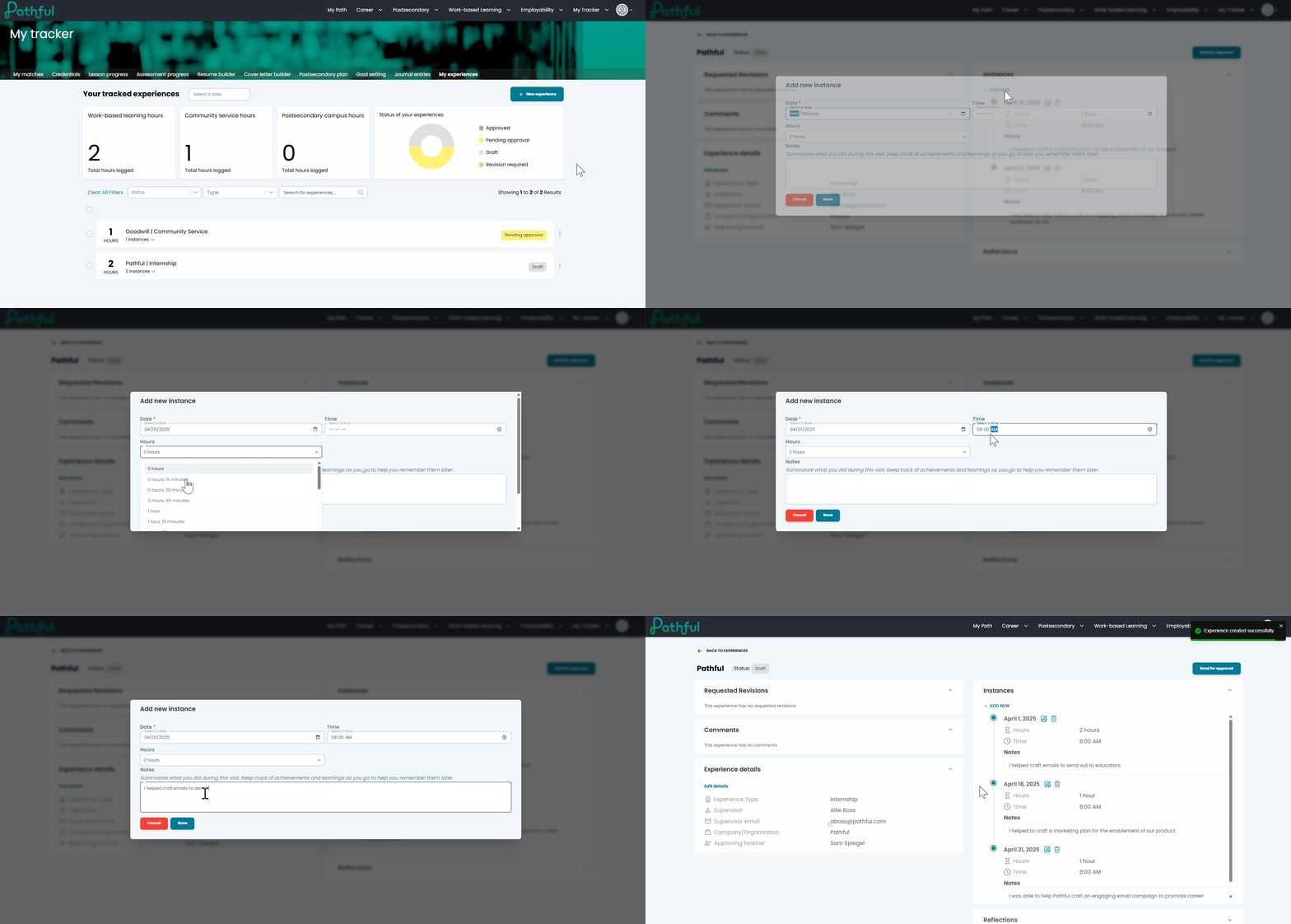
The real magic happens when learners add reflections. We've designed prompts that mirror common interview questions, helping learners articulate what they've learned in ways they can use later for college essays or job applications. Once complete, learners can submit their experiences for approval with a single click.

The educator experience
The Manage Experiences tab on your Dashboard is your command center for overseeing all learner experience tracking. Here you can view every experience created by any learner under your license, giving you complete visibility into their career readiness journey.
%20(1).gif)
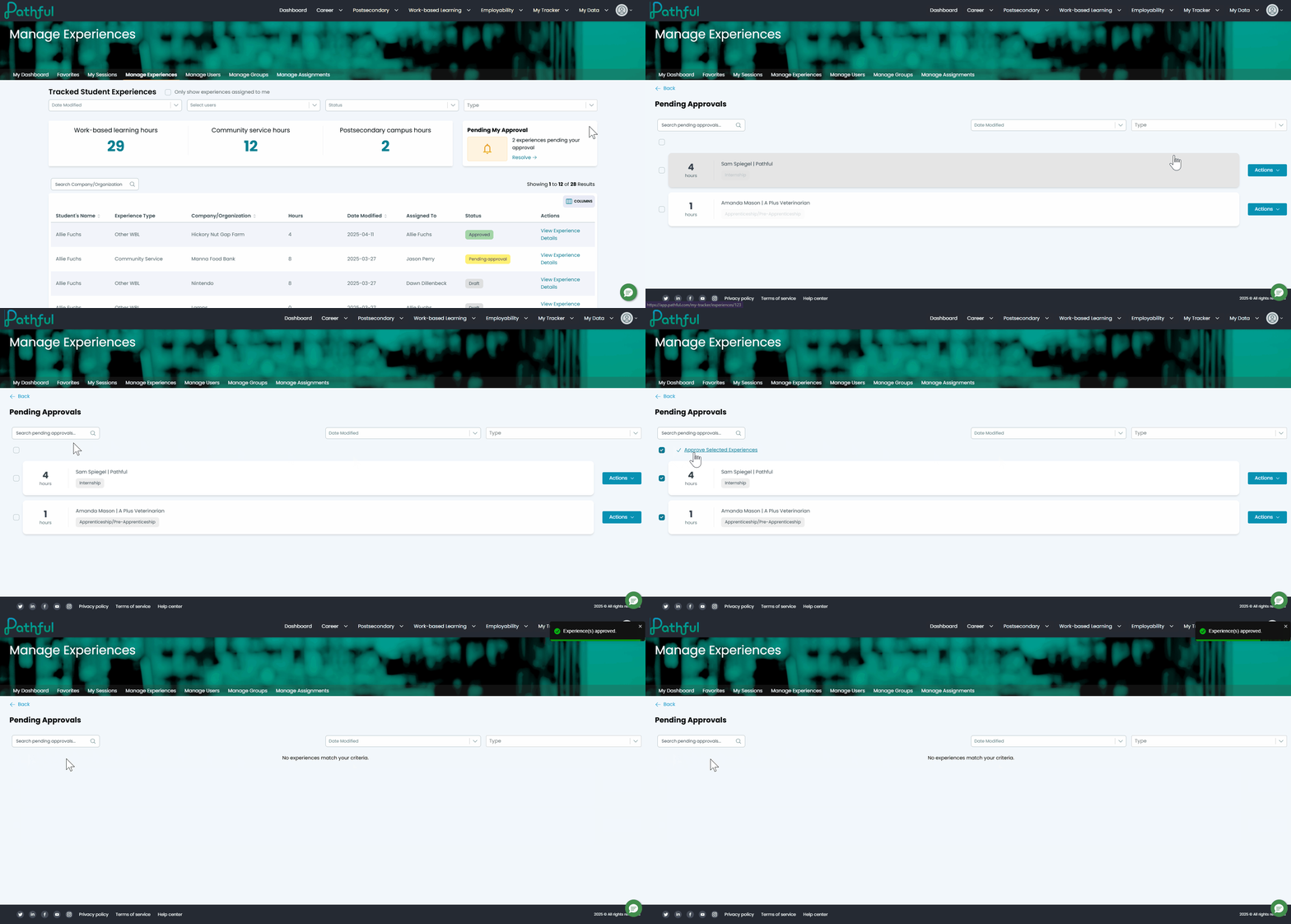
When a learner submits an experience for your approval, you can review all details, including their reflections and uploaded documents, then approve the experience or request revisions with helpful comments. While you can leave comments on any experience to provide guidance, you'll only see approval options for experiences that have been specifically submitted to you — keeping accountability clear.
.gif)
For those busy days when multiple submissions come in at once, the mass approval feature lets you efficiently process several experiences without reviewing each one individually — perfect for when you've already discussed these experiences with your learners in person.
Why it matters
It's not just about hours. The Experience Tracker saves time (no manual calculations or missing forms), makes requirement tracking and reporting exportable for state and district mandates, gives learners ownership and organizational skills, develops reflection through guided prompts, and provides complete oversight with clear approval boundaries. Available now for all Pathful users.
Ready to simplify your hour tracking?
The Experience Tracker is available now for all Pathful users. Streamline your career readiness documentation process and put an end to the days of spreadsheets and paper forms.
After all, you became an educator to teach and inspire — not to chase down forms!
Was this article helpful?
Thanks for letting us know!

Keep exploring.
Can't find what you need?
Our support team is here to help you make the most of Pathful.